


PBIS Rewards Family
3.472.00 Reviews
App Specs
- Version
- 500005
- Updated On
- License
- Free
- Downloads
- 100,000+
- Developer
- Navigate360, LLC
- Categories
- Education
- Platform
- Android
Screenshots
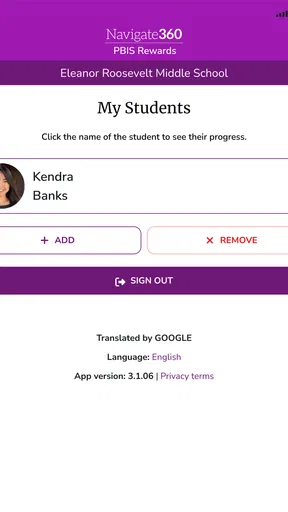
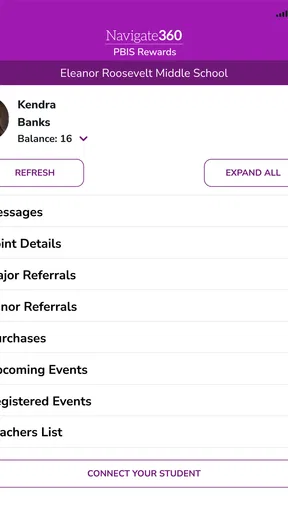
 Analysis by AppCompare
Parents often hear about PBIS at school without having a clear view of how it connects to home life. PBIS Rewards Family is designed as the parent and guardian side of the PBIS Rewards system, giving families a place to follow the school’s approach rather than asking children to explain every detail themselves. I found its purpose easy to understand: it is not a general learning platform, a homework manager, or a replacement for school communication. Its value depends on whether a child’s school actively uses PBIS Rewards and how consistently that school shares information through the system.
That distinction matters before installing it. The app is free, aimed at Everyone, and belongs in the education category. Navigate360, LLC develops it, and the app has been available since September 29, 2020. It requires Android 8.0 or later, so it is accessible on many older phones, although the experience will naturally vary with the age and condition of the device. I would describe it as a focused family portal: useful when it matches the school’s workflow, but limited if you are looking for a complete family-school communication hub.
What the family portal is really useful for
My first impression is that the app makes more sense when treated as a companion to an existing school program. PBIS, or positive behavioral interventions and supports, is built around recognizing and encouraging expected behavior. The family-facing app gives parents a way to stay connected to that process. Instead of relying only on a child’s memory, a paper notice, or a quick conversation at pickup, a guardian can check the information made available through the school’s PBIS Rewards setup.
The practical benefit is continuity. A child may be learning one set of expectations at school, while the family is trying to reinforce completely different habits at home. A portal such as this can help parents understand what the school is emphasizing and respond more constructively. That does not mean the app raises a child’s behavior by itself. It is a communication tool, and its success depends on adults using the information as a starting point for conversation rather than treating it as a scorecard.
A realistic example would be a guardian who works late and misses the informal conversations that happen at dismissal. After dinner, that parent can use the family portal to review the school-related information available there, then ask the child a specific question about the day. That is more useful than a vague “How was school?” because the conversation is connected to the school’s own behavior framework. The app’s strongest role is therefore not entertainment or constant engagement; it is helping families participate with better context.
Speed expectations during ordinary use
I would approach the app with modest speed expectations. A parent portal generally needs to open, authenticate, and present school information clearly; it does not need the rapid transitions of a game or a social feed. On a reasonably maintained Android device, the light, focused nature of the app should make ordinary checking feel more manageable than using a much larger education platform filled with lessons, videos, messaging threads, and assignments.
Still, a simple purpose does not guarantee instant results. The experience can depend on the phone, the operating system, the connection, and the school-side service. If the app is being opened after a long day, I would not judge it solely by whether every screen appears immediately. A short pause while information loads is less important than whether the correct family and school context appears once loading finishes. For this kind of tool, accuracy and clarity matter more than flashy responsiveness.
Worth Reading Before You Choose

EA SPORTS FC Mobile 26 Is a Bigger Football Game, but It Takes Time

Flipboard Shows What News Apps Must Do Beyond the Feed

Switching to Android Auto Means Rethinking Your Driving Routine

Google Calendar Makes a Crowded Week Easier to Manage

Ludo King Makes the Most of the Minutes Between Plans

Baby Panda World Brings Quick Play to Modern Phones, but Its Game Library Feels Busy
The best habit is to open it when you have a moment to read, not while walking through a crowded pickup area or trying to answer a child in a hurry. If you need information for an immediate conversation, allow a little time for sign-in and loading. That small change in expectations prevents the app from feeling unreliable simply because it was used at the least convenient moment.
What happens during heavier-use moments
The busiest moments are likely to be practical rather than technical: the start or end of a school day, a parent checking in after work, or a period when families are especially interested in recent behavior-related updates. In those situations, the important question is whether the portal remains understandable when you are checking quickly. I prefer an app like this to keep the main task obvious, because parents should not have to explore several unrelated areas just to understand what the school has shared.
There is also a human form of “heavy use” to consider. A family may open the portal repeatedly during a week when a child is struggling, or several guardians may want to stay informed about the same child. The app should be viewed as a reference point, not as a live monitoring system. Checking it constantly can create anxiety and turn positive behavior support into pressure. I would use it at sensible intervals, then combine what I learn with direct communication with the child and, when appropriate, the school.
One useful trade-off is that a specialized portal can feel less cluttered than a broad school app, but it may also cover fewer parts of daily school life. If your main need is attendance, grades, homework, lunch payments, or teacher messaging, a school’s general parent platform may be more efficient. PBIS Rewards Family is better suited to the narrower question of how the school’s PBIS process reaches the household.
Reliability depends on more than the phone
Reliability here has two layers. The first is technical: can the app launch, connect, and display the family’s information? The second is organizational: is the school using the PBIS Rewards system consistently enough for the portal to be worth checking? Even a stable app can feel empty or unhelpful if updates are irregular or if the school’s process is not clearly explained to families.
That is why I would not interpret a quiet screen as proof that nothing happened at school. The portal reflects the information made available through the system; it should not replace asking the school how often families should expect updates or what particular entries mean. This is one of the most important practical points for new users. Before forming conclusions about a child’s progress, learn how the school intends the portal to be used.
Recovery also matters. If the app is interrupted, the phone loses connectivity, or a session needs to be restarted, the sensible approach is to close and reopen it, check the connection, and try again without repeatedly tapping every control. If the issue continues, contact the school or the relevant support channel rather than assuming the child’s information has disappeared. A family portal is only useful when adults know where the app ends and the school’s responsibility begins.
I also recommend keeping the app updated when an update is offered through the normal app store process. The current version is 500005, and the minimum Android requirement is 8.0. Those details suggest that compatibility is not aimed only at brand-new phones, but an older device with limited storage, an aging battery, or an outdated system may still make any app feel slower. The phone’s condition can be as important as the application itself.
Device limits and everyday resource demands
Because this is a family portal rather than a media-heavy learning suite, I would expect its everyday resource demands to be relatively reasonable compared with apps that constantly stream video or run interactive lessons. That does not mean every Android phone will deliver the same experience. A device with very little free storage, many background apps, or a heavily worn battery can struggle with ordinary sign-in and switching between screens.
For a parent using an older phone, the key advantage is the Android 8.0 minimum. It avoids forcing families onto the newest hardware simply to access a school-related service. The practical limitation is that operating-system compatibility is only one part of performance. If the device frequently closes apps, loses its connection, or has trouble with other modern applications, this portal may not feel dependable even if it technically installs.
I would also avoid making the app the only place where important school information is kept. If a message or update affects a meeting, a concern about behavior, or a question for a teacher, note the relevant details and follow up through the school’s preferred communication method. This is not because the portal is unsuitable; it is because a specialized family view should support communication, not become a substitute for it.
On iOS, the same general principle applies: the quality of the experience depends on the supported app version and the condition of the device. The confirmed system requirement is for Android, so Android users can judge compatibility directly from that baseline. Families using Apple devices should simply follow the requirements shown for their device at installation time and avoid assuming that an Android requirement describes the iPhone experience.
Who will get the most from it
I think the app is a good fit for guardians whose children attend a school that actively uses PBIS Rewards and wants families involved in that process. It is especially useful for adults who cannot regularly speak with teachers in person, for separated households that both want a shared view of school-related information, and for parents who want a more concrete way to discuss expectations with a child.
It can also help families avoid a common mistake: treating behavior support as a series of punishments. When used thoughtfully, the portal can give adults a reason to notice progress and ask what helped a child succeed. A parent might use an update to start a conversation about preparation, cooperation, or respectful conduct, then connect that discussion to routines at home. The value is in the follow-through, not in opening the app repeatedly.
I would be more cautious if your school rarely uses the PBIS system or has not explained how the family portal fits into its communication routine. In that case, a general school app, email, a parent-teacher platform, or direct contact with the school may answer your questions more reliably. Likewise, families seeking detailed academic records should not choose this app as their main education dashboard. Its focused purpose is a strength only when that purpose matches your need.
How it compares with ordinary alternatives
The usual alternative is not necessarily another PBIS app. Many families already use a school website, email, a classroom communication service, or a broad parent portal. Those tools may offer more categories of information, but they can also bury behavior-related communication among calendars, assignments, announcements, and administrative notices. A dedicated family portal can be easier to understand when the question is specifically connected to PBIS.
The trade-off is breadth. A broad school platform is usually the better choice if you want one place for grades, attendance, schedules, teacher messages, and homework. A conversation with the teacher is better when the situation is sensitive or needs explanation. PBIS Rewards Family occupies a middle position: more structured than relying on a child’s verbal summary, but narrower than a complete school-management app.
That narrowness also affects privacy and family expectations in a practical way. I would use only the account and access method provided by the school, avoid sharing login details casually, and make sure every guardian understands that an app entry may need context. A positive behavior system works best when information is used respectfully. The app should support a child’s growth, not encourage adults to compare children or reduce a complicated school day to a single indicator.
My performance and usefulness verdict
After considering its role, device requirements, and likely use pattern, I see PBIS Rewards Family as a focused tool rather than an essential app for every household. Its performance expectations are modest and appropriate: quick enough for occasional checking, light enough to make sense on supported older Android devices, and most valuable when the school’s own process is active and clear. I would not install it expecting a full learning environment or a real-time communication stream.
The rating sits at a 3.4 average from 167 ratings, with 72 written reviews, and the app has passed 100K+ installs. Those figures suggest that it has reached a meaningful number of families while also leaving room for mixed experiences. I would read that combination as a reason to set realistic expectations, not as a simple recommendation or rejection. A portal can be genuinely helpful for one school community and much less useful for another depending on implementation.
My final recommendation is conditional but positive: install it if your child’s school uses PBIS Rewards and has given you a clear reason to use the family portal. Start by learning what information the school shares, how often it is updated, and whom to contact when something looks confusing. Use it as a prompt for supportive conversations, not as a replacement for teachers or a complete record of your child’s education.
For families in that situation, the free price removes the main barrier to trying it, and the Everyone age rating makes it suitable for a household-facing education tool. For families outside that situation, the app may simply add another login without solving a real problem. In my view, that is the honest way to judge it: its strongest feature is the connection between a school’s PBIS practice and a parent’s everyday follow-through, while its usefulness rises or falls with the quality of that connection.
Pros
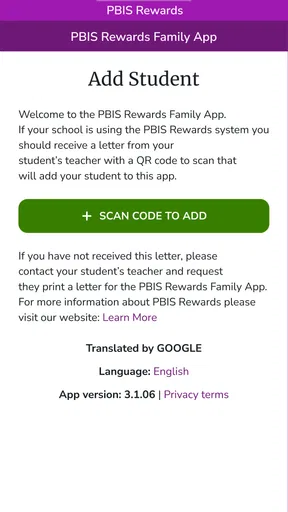
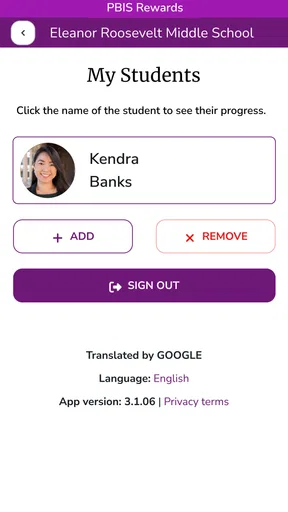
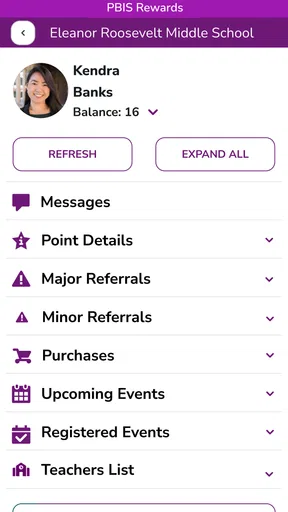
- Lets families view student behavior points and recognize positive choices.
- Provides a direct way to stay informed about school-based PBIS activities.
- Encourages conversations between parents
- students
- and school staff.
- Simple interface makes checking rewards and updates quick.
- Can help reinforce consistent expectations between home and school.
Cons
- Requires participating schools to use the PBIS Rewards platform.
- Some features may depend on permissions set by school administrators.
- Notifications and point updates may not appear immediately.
- Parents may need school-provided login details to access the app.
- Limited usefulness if a student’s school rarely updates rewards or activities.
FAQs for PBIS Rewards Family
What is PBIS Rewards Family, and who is it designed for?
PBIS Rewards Family is a companion app for parents and guardians whose children attend a school using the PBIS Rewards positive behavior system. It is designed to help families stay connected with their child’s behavior progress, view relevant updates, and understand how rewards or recognition are being used at school. Access and available features may depend on the school’s PBIS Rewards setup.
How do I sign in to PBIS Rewards Family?
To use PBIS Rewards Family, you generally need an account or invitation connected to your child’s school. The school may provide sign-in instructions, an access code, or require you to register using an email address or phone number. If you cannot connect your child’s profile, the school’s PBIS administrator or classroom staff should verify that your contact information is correctly linked in the system.
What information can parents see in the app?
The information displayed can vary by school, permissions, and the features enabled by administrators. In general, families may be able to review behavior-related updates, positive acknowledgments, reward activity, or other school-provided information connected to their child. The app is not necessarily a complete academic or disciplinary record, so parents should contact the school if they need details that are not shown.
Does PBIS Rewards Family allow parents to give or redeem rewards?
PBIS Rewards Family primarily helps families view and engage with information from the school’s PBIS program, but reward functions depend on how the school has configured the platform. Some schools may allow parents to see points, incentives, or redemption activity, while others may use the app only for communication and progress updates. The school determines which rewards are available and how they can be used.
Is PBIS Rewards Family free and safe to use?
The app is generally intended to be available to families without a separate subscription fee, although the school must use the PBIS Rewards platform and may control access. As with any education app, users should download it from an official app store, protect their login details, and review the requested permissions. Because the app may handle information about children, families should also read the current privacy policy and follow school guidance.


